
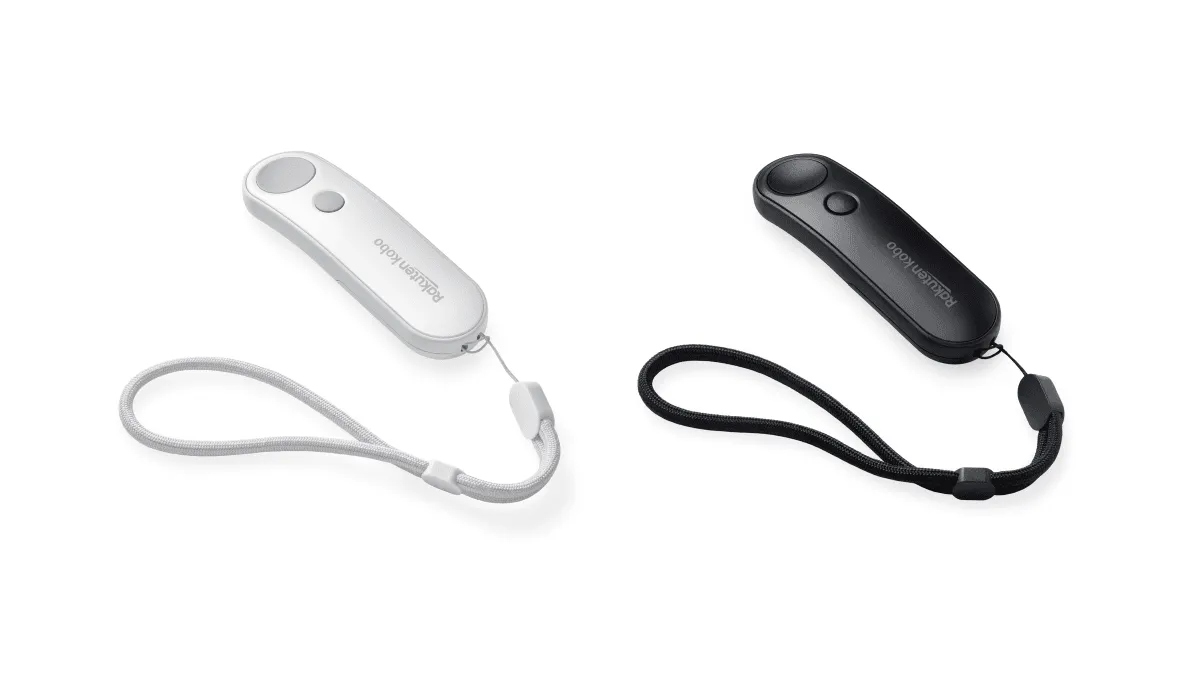
I bought a Bluetooth page turner after seeing approximately four hundred TikToks of people reading in bed with their hands tucked under a blanket, clicking a little ring remote. The hype made it look magical. The reality is… slightly more complicated. But after months of use across different devices and scenarios, I can say with confidence: for certain kinds of readers, a page turner is a genuinely transformative accessory. For others, it’s a drawer-filler. Here’s everything you need to know to figure out which camp you’re in.
How these things actually work
Bluetooth page turners aren’t magic — they’re just remotes that send a standard Bluetooth HID (Human Interface Device) signal. When you click the button, the remote sends a keyboard keypress or a volume up/down command over Bluetooth. Your e-reader receives it and, if it’s been configured to interpret that signal as a page turn, flips the page. That’s the entire technical story.
The two approaches differ in what kind of signal they send. Remotes like the 8BitDo Zero 2 identify themselves as Bluetooth keyboards and send arrow key or volume key inputs. A clip-on receiver like the Syukuyu sends a signal to a tiny dongle that physically touches your screen — it’s literally a robotic finger. The dongle approach is a hack, but it’s a hack that works on any capacitive touchscreen regardless of whether the device has Bluetooth page-turn support natively. That’s why the Syukuyu-style devices are the most universally compatible option.
Wireless page turners that use RF (radio frequency) instead of Bluetooth also exist. These come with a dedicated receiver dongle that plugs into or clips onto the device. They don’t require pairing and have lower latency than Bluetooth, but the dongle is one more thing to keep charged and they’re generally limited to the clip-on-screen approach. The market has mostly consolidated around Bluetooth because it’s simpler, but RF variants are still sold under brands like Donner and have their fans.
What actually works (by product type)
There are three kinds of page turners people actually use, and they’re not created equal.
Syukuyu-style clip remotes (~$16–20). These come with a receiver that clips onto an e-reader screen and physically taps it. The ring remote sends the signal over Bluetooth. This is the most popular setup on TikTok and it genuinely works — the receiver simulates a finger tap through the screen. The receiver arm has a small capacitive pad at the tip that the screen reads as a human touch. Because it’s physically making contact with the screen, there are no compatibility issues — it works on any device with a capacitive touchscreen, Kindle, Kobo, BOOX, even an iPad if you wanted to. The downside: the clip sits on your screen like a weird little antenna. You’ll notice it. Some people get used to it within a day; others never do. The receiver also needs to be positioned carefully — if it slips even a millimeter off the active area of the screen, the tap won’t register.
8BitDo Zero 2 (~$20). A tiny game controller that pairs over standard Bluetooth as a keyboard. If an e-reader supports Bluetooth keyboards or gamepads, this is the cleanest option — nothing clips to your screen. Works flawlessly on BOOX Android devices, where you just pair it like any Bluetooth keyboard and map the D-pad buttons to page turns in your reading app. On Kindle, it’s trickier because Kindle Bluetooth is locked down to Audible only by default. On Kobo, you need to enable a developer option to accept Bluetooth keyboard input. The Zero 2 is also just a delightful little object — it’s the size of a key fob, has a satisfying click, and feels like something Nintendo designed. If your device supports it, this is the one I’d recommend.
Generic ring remotes (~$10–15). These are the cheapest but the most hit-or-miss. I tried two from AliExpress. One paired immediately and worked for three weeks before the battery gave out; the other never connected. Buy these only if you’re comfortable with the possibility of tossing $10 in the trash. Quality control varies so wildly that even positive reviews on listing pages don’t guarantee you’ll get a working unit. If the price difference between a generic ring remote and a Syukuyu is only $5, spend the extra $5.
Compatibility by device brand
Not all e-readers welcome page turners with open arms. Here’s how each major platform handles them.
Kindle. This is the most annoying one. Regular Bluetooth page turners don’t work natively on Kindle — Kindle’s Bluetooth is reserved for Audible audiobooks. The workaround is enabling VoiceView, Kindle’s accessibility screen reader, which unlocks Bluetooth HID support. You pair the remote through VoiceView’s menu (Settings → Accessibility → VoiceView Screen Reader), and VoiceView starts narrating everything on screen until you mute it by holding the volume buttons. Once paired, the remote works, but the setup process feels like you’re exploiting a bug. Amazon could fix this with a firmware toggle, but they haven’t, and at this point it’s not clear they ever will. The clip-on receiver approach (Syukuyu) bypasses this entirely since it doesn’t need Bluetooth pairing — the dongle just taps the screen. If you’re Kindle-only and don’t want to deal with VoiceView, get a clip-on remote.
Kobo. Kobo devices with Bluetooth (Libra Colour, Sage, Elipsa, Forma) can pair with Bluetooth keyboards and remotes, but the feature is hidden behind a developer menu. You need to enable it by typing devmodeon into the Kobo search bar, then navigating to the newly unlocked “Beta Features” section where you’ll find a Bluetooth keyboard toggle. Once enabled, pair your 8BitDo Zero 2 or similar remote. In the Kobo reading app, you’ll need to install the NickelMenu plugin to map the remote’s buttons to page-turn actions. It’s a few extra steps, but the setup is permanent once done and much cleaner than the Kindle VoiceView hack.
BOOX and Android e-readers. These are the easiest. BOOX devices run full Android, so you pair any Bluetooth remote just like you would with a phone — through the Android Bluetooth settings menu. In your reading app (NeoReader, Kindle for Android, KOReader), go to the key mapping or gesture settings and assign the remote’s buttons to next page and previous page. No hacks, no workarounds. This is where the 8BitDo Zero 2 shines brightest — pair it once, map the D-pad, and you’re done. Meebook and other Android-based e-reader brands work identically.
reMarkable. The reMarkable 2 has no Bluetooth support at all, so page turners are not an option. The reMarkable Paper Pro added Bluetooth capability, but it’s currently limited to the Type Folio keyboard and doesn’t support generic HID devices. Clip-on screen tappers should theoretically work on the capacitive touch layer, but the reMarkable’s screen surface and touch sensitivity are tuned differently from e-readers and results are inconsistent. If you’re on reMarkable, you’re tapping the screen for now.
Setting up on different devices (step by step)
For the Syukuyu clip-on remotes, setup is universal: charge the receiver, clip it to the edge of your screen so the tap pad sits over the right margin of the page (where page-turn taps typically register on an e-reader), pair the ring remote via Bluetooth to the receiver (not to the e-reader), and you’re done. The only calibration step is adjusting the clip’s position so the tap lands consistently. Most reading apps let you choose which side of the screen triggers a forward page turn — set it to match where your clip is mounted.
For the 8BitDo Zero 2 on BOOX: put the controller in keyboard mode (hold Start + X to power on), pair it in Android’s Bluetooth settings, then in NeoReader’s settings map the D-pad right to “next page” and D-pad left to “previous page.” On Kindle with VoiceView: enable VoiceView in Accessibility, then from the VoiceView menu choose “Bluetooth Devices,” put the Zero 2 in keyboard mode, and pair it. The D-pad should cycle through VoiceView navigation, but once you mute VoiceView, the directional inputs will still register as page-turn commands in most reading contexts.
Positioning and mounting options
A page turner is only half the equation. You need a way to hold your e-reader at reading distance without holding it in your hands. The two most common approaches are a gooseneck stand clamped to a bed frame or nightstand, or a tablet floor stand next to a couch or chair. Gooseneck stands are cheap ($15–$25) and take up no floor space, but the clamp needs a surface to grip — a bed headboard, a nightstand edge, a desk. Floor stands ($30–$60) position the device anywhere and don’t require a clamping surface, but they have a footprint and you’ll trip over the base occasionally.
For treadmill and exercise bike reading, a music stand or a tablet mount that attaches to the equipment’s handlebars works better than a gooseneck, which will bounce with every step. For kitchen reading, a simple fold-out tablet stand on the counter keeps your device away from spills and lets you tap the remote with a clean hand while the other hand is covered in flour.
Battery life comparison
Most ring remotes use coin cell batteries (CR2032) that last months under normal use. My Syukuyu ring is still on its first battery after four months of nightly reading. The receiver that clips to the screen has its own rechargeable battery and needs charging every couple of weeks via USB-C, because it’s doing the actual work of powering a small actuator that physically moves the tap pad. The 8BitDo Zero 2 has an internal rechargeable battery rated for about 8 hours of continuous use, but since page turns are momentary button presses, it lasts weeks between charges in practice. Generic ring remotes have wildly variable battery life — the CR2032 might last six months or two weeks depending on build quality and whether the device properly enters sleep mode when idle.
The bottom line: none of these devices have battery life bad enough to be a real pain point, but there are two batteries to think about with the clip-on remotes (remote + receiver), not one.
DIY alternatives
If you’re handy and don’t want to spend money, there are low-tech solutions. A selfie stick Bluetooth remote (the kind that came free with every phone case in 2016) can sometimes be repurposed as a page turner — many of them identify as Bluetooth volume buttons, and if your e-reader’s reading app maps volume keys to page turns (as KOReader and some Android reading apps do), you’re in business. You can also build a physical page-turn button using an Arduino Micro or ESP32 with a capacitive touch sensor and a 3D-printed clip, but by the time you’ve bought the parts and put in the hours, you’ve spent more in time and materials than a Syukuyu costs. The DIY route is fun if you enjoy the project; it’s not cost-effective if you just want to read hands-free.
Pros and cons
Pros: Hands-free page turning is genuinely comfortable in cold weather, in bed, or when your device is mounted out of arm’s reach. They’re small, cheap, and easy to travel with. They reduce wear on your screen from repeated swipes. For readers with limited hand mobility, arthritis, or repetitive strain issues, a page turner can make the difference between reading comfortably and not reading at all. They’re also excellent for reading while eating — no greasy fingerprints on your screen.
Cons: The clip-on receivers are ugly and block a sliver of your screen. The Kindle VoiceView setup is clunky and unintuitive. Not all e-readers support Bluetooth remotes natively, and the ones that do often require digging through accessibility menus or developer settings. There’s another device to keep charged. And if you mostly read holding your e-reader in your hands, a page turner solves a problem you don’t have — the tap-to-turn gesture you’ve been making for years is faster and more reliable than any remote.
Reading scenarios where a page turner shines
Bed reading with a gooseneck stand. This is the canonical use case and the one TikTok is obsessed with. Device clamped above you, hands under the blanket, click to page-turn. In a cold bedroom, it’s a small luxury that makes a real difference.
Treadmill and exercise bike. Holding an e-reader steady while moving is awkward, and swiping to turn pages on a bouncing screen is frustrating. Mount the device on the equipment’s display ledge, clip on the remote, and you can read hands-free without breaking stride.
Cooking and kitchen reading. Propping your Kindle on the counter while following a recipe means your hands will be wet, oily, or flour-covered at some point. A page turner lets you scroll through instructions without touching the screen and transferring whatever’s on your fingers to the device.
Accessibility. For readers with limited hand mobility, arthritis, carpal tunnel, or conditions that make repetitive swiping painful, a Bluetooth remote can be genuinely enabling. The 8BitDo Zero 2’s large D-pad buttons are easier to press than aiming a fingertip at a specific zone on a screen. The Syukuyu ring can be worn loosely and activated with minimal finger pressure. Neither is a medical device, but the ergonomic difference is real and worth considering if touchscreen fatigue is an issue in your reading life.
Is it worth it?
If you read in bed with a gooseneck stand, yes — it’s genuinely nice. Hands under the covers, click to turn, no reaching up to swipe. If you read on the couch holding your device normally, skip it. You’ll use it twice and then the novelty wears off. The people who love these the most are the ones who’ve built a whole cozy reading rig with a stand and a blanket. If that’s you, the Syukuyu is $16 well spent. If you’re on a BOOX device and want the cleanest possible setup, the 8BitDo Zero 2 at $20 is the better pick — no screen clip, and the build quality is a noticeable step up from the generic alternatives.