
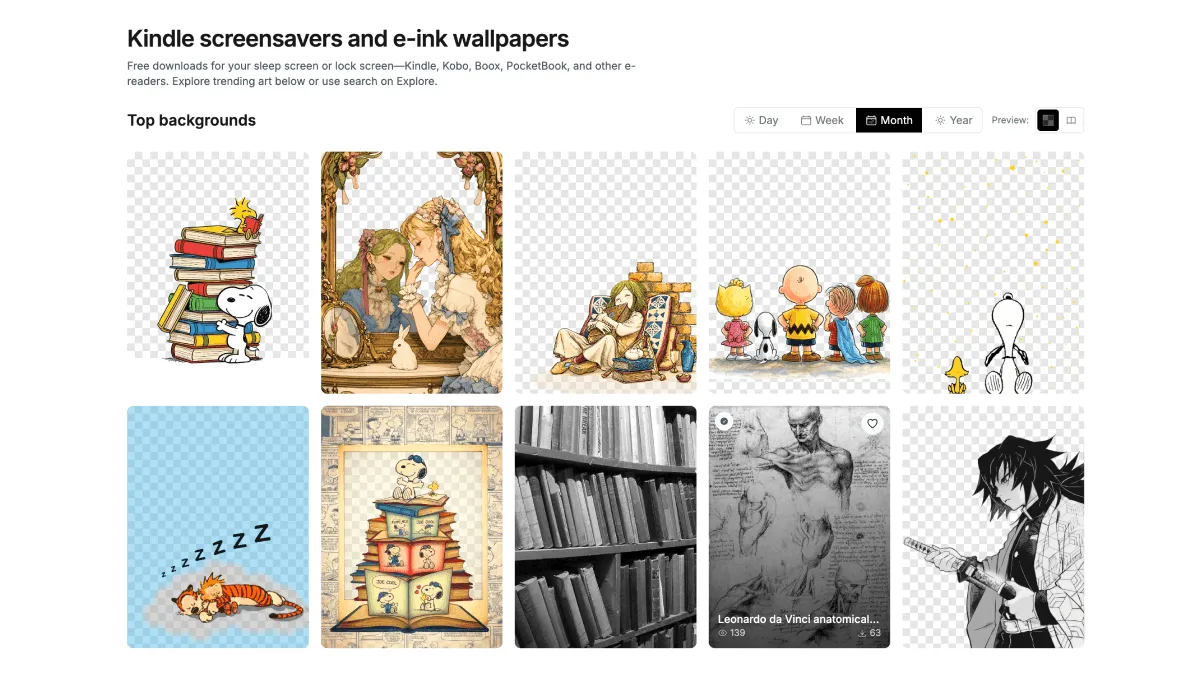
Kindle screensavers are famously boring — a pencil, a typewriter, or a book ad. ReaderBackdrop is a free gallery of wallpaper images specifically designed and contrast-tuned for E Ink screens. If you have ever tried dropping a regular JPEG onto a Kindle only to find it looks washed out, muddy, or letterboxed with weird black bars, ReaderBackdrop is the fix you have been looking for. It solves the three problems that make DIY screensaver attempts fail: low contrast, wrong resolution, and midtones that E Ink cannot reproduce.
What ReaderBackdrop actually does
ReaderBackdrop is not a screensaver app or a Kindle hack — it is simply a curated library of high-resolution images that have been manually adjusted to look good on grayscale E Ink panels. The person behind it takes source artwork and processes each file so that the blacks are deep, the whites are clean, and the midtones are remapped into something a Kindle can actually render. The result is wallpapers that pop rather than looking like photocopies of photocopies.
The site is organized into themed collections so you can find something that matches your taste without scrolling through hundreds of random images:
- Anime & Manga — high-contrast panels from popular series, chosen because manga line art translates beautifully to E Ink. Think bold outlines, sharp shadows, and minimal gradients.
- Nature & Botanical — clean line art, silhouettes, and carefully selected black-and-white photography of plants, landscapes, and animals.
- Minimalist & Abstract — geometric patterns, typography designs, and simple compositions with strong black-and-white separation. These age well since there is no subject to get tired of.
- Black & White Collection — images optimized specifically for maximum contrast on E Ink. If you only browse one section, make it this one.
Each image is pre-sized to common Kindle display resolutions. For a Paperwhite 5 or 6 (11th and 12th Gen), that means 1236×1648 pixels. The Kindle Basic 2024 model uses 1072×1448, and the Scribe uses 1860×2480. ReaderBackdrop labels which resolution each image targets, so you do not end up with a stretched or cropped mess.
Supported devices
Because ReaderBackdrop just gives you image files, it works with any e-reader that can display a custom lock screen image. In practice, that covers:
- Kindle Paperwhite (10th Gen and newer)
- Kindle Oasis (all generations)
- Kindle Scribe
- Kindle Basic (10th Gen and newer, 2022 and 2024 refreshes)
- Kindle Voyage (still a beloved device in the community)
- Kobo devices — via KOReader’s screensaver feature or NickelMenu tweaks
- BOOX and other Android e-ink tablets — these let you set any image as a lock screen natively from Android settings, so you do not even need the workaround
Older Kindles with physical keyboards (Kindle 3, Kindle DX) technically work too but use different resolutions — you would need to crop images manually for those.
Step-by-step: how to get ReaderBackdrop images onto a Kindle
The entire process takes about five minutes and does not require a jailbreak or any paid software. Here is the exact workflow:
Step 1 — Download images. Go to readerbackdrop.com, browse the collections, and click the ones you want. Each image downloads as a single JPG or PNG file to your computer. Download several at once — you will want options.
Step 2 — Convert to EPUB. This is the crucial step. A Kindle cannot display a raw JPG as a screensaver; it needs the image to be inside a “book” so the Kindle treats it as a cover. Use Calibre (free, open-source, runs on Windows, Mac, and Linux). In Calibre, click Add Books, select your downloaded images, then Convert Books → output format EPUB. Each image becomes its own tiny EPUB file.
If you do not want to install Calibre, any online “JPG to EPUB” converter will work. Just search for one, upload your image, download the resulting EPUB.
Step 3 — Send to Kindle. Amazon gives you a unique Send to Kindle email address for each device (find it under Settings → Your Account → Send-to-Kindle Email on the device itself, or in your Amazon Content & Devices page). Email the EPUB files to that address, or use the Send to Kindle web app. Wireless delivery takes about a minute.
Step 4 — Set the screensaver. On your Kindle, find the delivered “book” in your library and open it. Immediately lock the screen (press the power button). The Kindle displays whatever the current book’s cover is — and since your “book” is just the wallpaper image, that is exactly what you see on the lock screen. To switch to a different wallpaper, open a different one of your delivered image-books and lock the screen again.
That is it. There is no permanent modification, no risk of breaking anything, and it costs nothing.
Alternative methods worth knowing
The “fake book” trick above is the simplest path, but it is not the only one. If you want more flexibility, here are the alternatives:
Pay Amazon $20 to remove ads and use the built-in book cover feature. Go to amazon.com/myk → Devices → select your Kindle → Remove Special Offers. Once ads are gone, enable Settings → Device Options → Display Cover, and your screensaver becomes the cover of whatever you are currently reading. No custom images, but zero effort and it is permanent.
Jailbreak + Screensavers Hack. If you are willing to jailbreak your Kindle (our jailbreak guide walks through it), you can install the Screensavers Hack from the MobileRead forum. This replaces the default screensavers entirely with a rotating gallery of your own images. It supports random ordering, timed rotation, and overlay text. The setup takes about 30 minutes, but once it is done, you never touch it again.
KOReader’s screensaver feature works on Kobo without jailbreak and on Kindle with jailbreak. It can show book covers, random images from a folder, or even a sleep message. On Kobo, you install KOReader through NickelMenu; on Kindle, it requires a jailbreak first. The advantage is that KOReader gives you per-book control — different screensavers for different books if you want that.
Where to find or design your own screensavers
ReaderBackdrop is the best zero-effort source, but if you want something more personal, there are plenty of places to look:
- Unsplash and Pexels — free stock photo sites with high-resolution images. Download in black-and-white, or desaturate them yourself before converting to EPUB.
- DeviantArt and ArtStation — search for “E Ink wallpaper” or “grayscale art.” Many artists share black-and-white pieces that work perfectly.
- Make your own in Canva or Figma. Set the canvas to 1236×1648 (or your device’s resolution), choose a monochrome palette, and design something simple. Bold typography quotes, minimalist geometric patterns, or silhouettes all work great.
- r/kindle and r/kobo on Reddit — community members frequently share screensaver packs. Search for “screensaver” or “wallpaper” and sort by top.
- MobileRead forums — the long-running hub for e-reader enthusiasts. The Kindle Developer’s Corner subforum has dedicated screensaver threads with community-curated collections.
Whenever you source images elsewhere, remember the golden rules: stick to black-and-white or heavily desaturated images, avoid complex gradients, and make sure the resolution matches your device. An image that looks crisp on your laptop will look like a grey smear on E Ink if it relies on subtle color transitions.
Troubleshooting common problems
“My screensaver looks washed out.” The image probably has too many midtones. E Ink screens have a limited number of grey levels — go back and pick something from ReaderBackdrop’s Black & White Collection instead, or increase the contrast of your image in an editor before converting.
“There are black bars on the sides.” The image resolution does not match your Kindle’s screen. Check your device’s exact resolution (search “[your Kindle model] screen resolution”), resize the image to match, and reconvert.
“The screensaver does not show up at all.” Two possible causes: either you forgot to open the “book” before locking the screen (the Kindle needs the image-book to be the active document), or the EPUB did not transfer correctly. Try the Send to Kindle web app instead of email — it is more reliable.
“Amazon ads still show up even after I set a screensaver.” If your Kindle has Special Offers (the cheaper ad-supported model), the ads override any book cover. Either pay the $20 removal fee, politely ask Amazon support to remove them for free (many users report success with a quick chat), or see our dedicated screensavers guide for workarounds.
“I sent the file but it never arrived on my Kindle.” Check that your sending email address is on your Kindle’s Approved Personal Document Email List (under Settings → Your Account → Send-to-Kindle Email → Approved Senders). Also confirm the EPUB file is not corrupted — try opening it in Calibre’s viewer first.
What happens after a Kindle software update
The nice thing about the fake-book method is that software updates do not break it. Amazon cannot patch away the fact that a Kindle displays book covers on the lock screen — that is a core feature they themselves built. What an update can do is reset any display settings you tweaked, so if your screensaver stops showing after an update, just make sure Settings → Device Options → Display Cover is still turned on and that you are opening the image-book before locking.
Jailbreak-based methods (the Screensavers Hack) are less resilient. A major Kindle firmware update will often overwrite the jailbreak, requiring you to redo the installation. If you go the jailbreak route, consider leaving Wi-Fi off to prevent automatic updates, or follow the MobileRead forum threads for patched jailbreak versions that survive updates. For most people, though, the ReaderBackdrop + fake-book approach is the sweet spot: it looks great, it costs nothing, and it survives every update Amazon throws at it.