
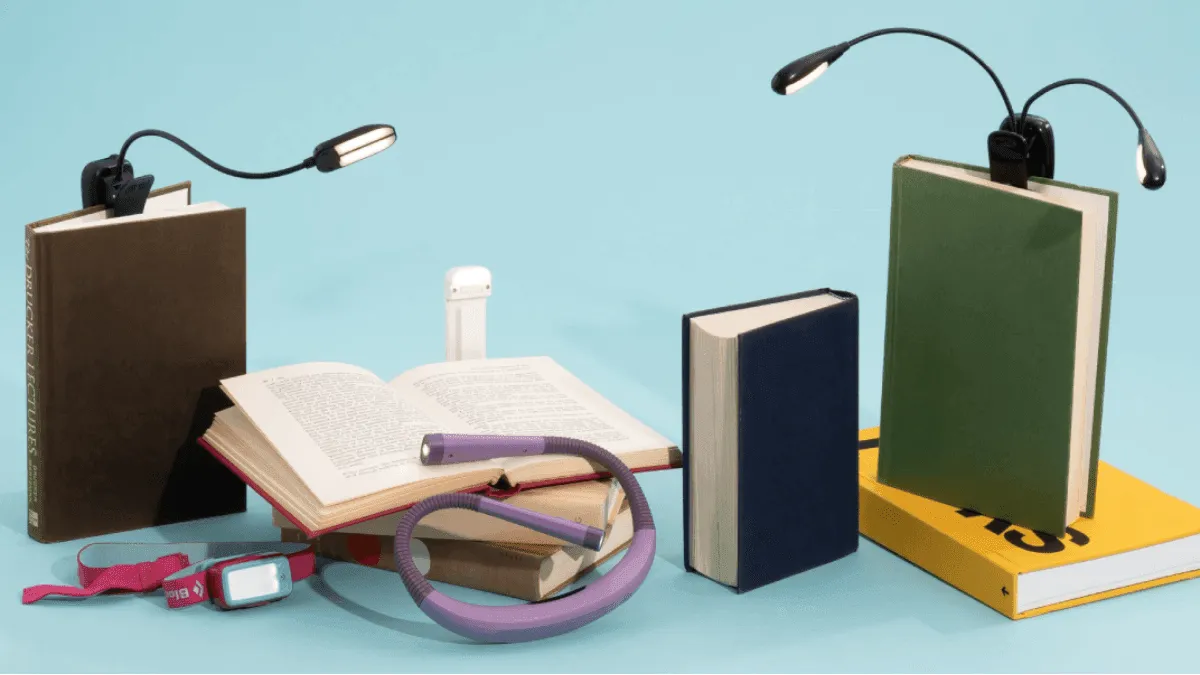
Not every e-reader has a built-in front light. If you’re using an older Kindle Basic (10th gen or earlier), a reMarkable 2, or any budget device without illumination, a clip-on reading light is the difference between reading at night and not reading at all. Even if a device has a front light, sometimes a focused external beam is better — especially if you share a bed with someone who’s trying to sleep.
When you actually need an external light
Front-lit e-readers have been standard for years, but plenty of devices still ship without one. The reMarkable 2 and reMarkable Paper Pro have no front light — they’re designed to look like paper under ambient light, and that’s the entire concept. Older Kindle Basic models (10th gen and earlier) lack illumination. Many budget Android E Ink tablets cut the front light to hit a price point. And some readers simply prefer e-readers without front lights because they find even the warmest LED layer creates a subtle glow that feels less like paper.
There’s also the blue light argument. E-reader front lights, even in warm mode, emit some blue-spectrum light. If you’re extremely sensitive to blue light before bed — or if you’re following a strict sleep hygiene protocol — an external amber LED light that emits zero blue light gives you more control than the built-in warm light can. Front lights also create a slight halo effect on the edges of the screen that some readers find distracting; an external light positioned correctly eliminates that.
Types of reading lights
Three form factors dominate the market, and each serves a different scenario.
Clip-on lights attach directly to the e-reader or its case. They’re compact, portable, and keep the beam aimed at the screen as you shift positions. The downside is weight — 30 to 50 grams on top of the device changes the balance, especially on lightweight 6-inch readers. Clip-ons work best on devices with a case, because clamping directly onto the screen bezel can press against the display over time.
Neck lights hang around your neck like a pair of flexible headphones, with two small LED modules on articulated arms. They’re hands-free, distribute weight to your shoulders rather than the device, and cover a wider reading area. The trade-off is that you look like you’re wearing a piece of medical equipment, and at around 130 grams, they become noticeable after an hour.
Clip-on stand lights clamp to a headboard, desk, or side table rather than to the e-reader itself. They provide the most stable, glare-free lighting because you can position them independently of the device. They don’t travel well, but for a permanent bedside setup, they’re the best option. The beam stays fixed while you reposition the e-reader freely.
The Glocusent neck light: overhyped but useful
Every book blogger on Instagram pushed the Glocusent neck light for a while, and I get why: it’s hands-free, the amber-only mode is genuinely good for pre-sleep reading, and it looks cool draped around your neck. The downside is weight — about 130 grams resting on your collarbone, and after an hour I notice it. It works, but it’s not the magical accessory TikTok made it out to be.
The Glocusent has three color temperature modes: cool white (6000K), warm white (3300K), and true amber (1800K). Each has three brightness levels. The amber mode eliminates blue light entirely, which matters for melatonin production. Battery life is excellent — about 80 hours on the lowest setting, which translates to weeks of nightly reading. It charges via USB-C, and a full charge takes roughly 90 minutes. The arms are flexible but hold position well, and the LEDs have diffusers that prevent harsh hotspots on the screen.
The classic Mighty Bright: still the benchmark
The Mighty Bright XtraFlex 2 has been around forever. Dual LEDs give even coverage across a 6-to-7-inch screen, and the flexible gooseneck lets you angle precisely. It takes AAA batteries — which in 2026 sounds like a downside, but it also means you never have a dead light and a dead charger at the same time. Swap the batteries and keep reading.
One AAA battery lasts about 20 hours, so a four-pack covers a couple of months of nightly reading. The clip is padded and fits cases up to about 8 mm thick — fine for most e-reader cases, too tight for tablets. At around 35 grams, it’s lighter than most rechargeable alternatives, and at around $12, it’s the cheapest recommendation here.
USB-C rechargeable vs AAA
Rechargeable lights are convenient until you forget to charge them mid-chapter. AAA-powered lights are annoying until you realize AAAs are always in a drawer somewhere. I keep one of each. The rechargeable is my daily driver; I bring the battery-powered one when traveling so I don’t pack yet another cable.
If you go rechargeable, look for USB-C specifically. Micro-USB reading lights still dominate the budget end of the market, and in 2026 that cable standard is a nuisance — one more cable to keep track of, one more port that doesn’t match anything else you own. The Glocusent and the newer Gritin models use USB-C. The Mighty Bright doesn’t, but it uses AAAs so it doesn’t matter.
Brightness and color temperature: what to look for
Brightness for a reading light is measured in lumens, but lumens alone don’t tell you much — beam angle matters more. A 20-lumen light with a tight, focused beam can be brighter on the page than a 50-lumen light with a wide flood. For a 6-to-8-inch e-reader screen, 15 to 25 lumens in a focused beam is the sweet spot. More than that and you’ll get glare bouncing off the screen into your eyes.
Color temperature is the more important spec. Cool white (5000K–6000K) feels bright and alert — good for daytime reading but disruptive before bed. Warm white (2700K–3300K) is gentler and mimics incandescent bulbs. True amber (1800K) contains zero blue light and is the only safe option for pre-sleep reading if you’re sensitive to blue light exposure.
The budget Gritin clip-on light has a warm mode around 3000K that’s decent but not truly amber. If sleep quality matters, spend the extra $5 for a light with a real 1800K amber mode. The Glocusent has it. The Vekkia neck light has it. The Hooga clip light has it and costs under $15.
Recommended products by budget
| Budget | Product | Type | Key feature |
|---|---|---|---|
| Under $15 | Mighty Bright XtraFlex 2 | Clip-on | AAA-powered, reliable, ultra-portable |
| Under $15 | Hooga Reading Light | Clip-on | True amber mode, USB-C rechargeable |
| Under $25 | Gritin 9 LED | Clip-on | 9 brightness levels, wider coverage |
| Under $30 | Glocusent Neck Light | Neck | Amber mode, 80-hour battery, hands-free |
| Under $30 | Vekkia Neck Light | Neck | Lighter than Glocusent, 3 color modes |
External lights vs built-in front lights
A good built-in front light is better than any clip-on for most situations. It’s weightless, evenly distributed, and adjustable in both brightness and warmth. The Kindle Paperwhite’s warm light goes from cool white to deep amber with a single slider. It doesn’t add weight, doesn’t need charging separately, and doesn’t catch on things when you move the device.
But a front light can’t do everything. It can’t light up a physical notebook next to the e-reader if you’re taking notes. It can’t be aimed at a specific area while keeping the screen dim for a sleeping partner. And on some devices — particularly budget models — the front light has uneven illumination with noticeable shadows near the bezel. A clip-on light bypasses all of these limitations.
The amber-only mode matters more than the brightness number. A true amber mode — 1800K, no blue component — won’t suppress melatonin the way even “warm” white LEDs will. If you read in bed and struggle to fall asleep, this is the feature to prioritize. The Glocusent has it. The cheaper Gritin clip light has a warm mode that’s decent but not truly amber. Spend the extra $5 for real amber.
Weight on the device
A clip-on light adds 30–50 grams to the top of an e-reader. On a lightweight Kindle Basic (158g), the center of gravity shifts and one-handed reading gets awkward. On a Kobo Libra Colour or Kindle Oasis with asymmetrical grips, it’s less noticeable because your hand already supports the heavier side. If you clip on regularly, the neck light’s hands-free design starts making more sense.
If you’re buying one light, get something with real amber mode. If a device already has a front light, try turning it down to 5–8% in a dark room before buying an external light at all — you might not need one.