
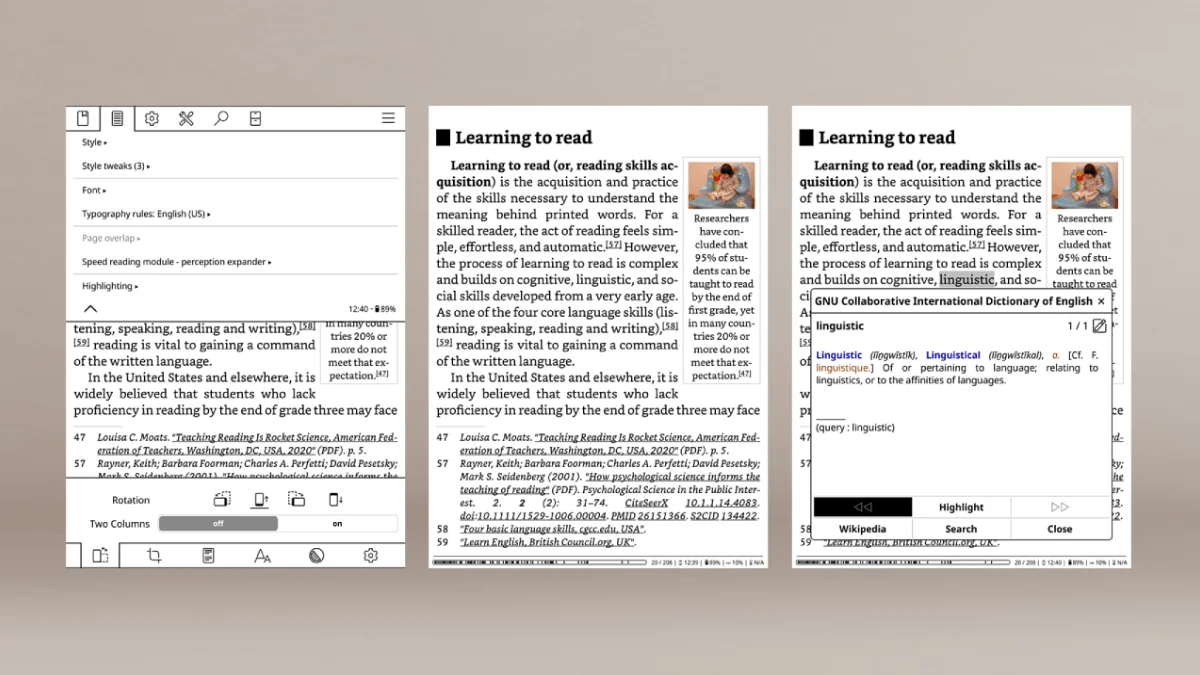
I installed KOReader on a jailbroken Kindle and immediately felt like I’d unlocked a different device. The stock Kindle reader is fine for Amazon purchases, but KOReader handles everything else — PDFs, comics, EPUBs, even DJVU files from old academic archives — with a level of control that Amazon simply doesn’t offer.
The PDF reflow alone justifies the install. Stock Kindle reflow is basic at best; KOReader’s version actually understands multi-column layouts and reflows them in reading order. I loaded a two-column academic paper and it reflowed cleanly without mixing up paragraphs. That’s the moment I uninstalled the Kindle app from my iPad and committed to KOReader for all my non-Amazon reading.
Installation is straightforward if a Kindle is already jailbroken with Sanctuary. Open the search bar, type ;kpm install koreader, and KPM downloads and installs everything. It takes a couple minutes and KOReader appears in a library like a regular book. Manual install via USB also works if you download from GitHub, but KPM is smoother.
The settings menu is deep — almost intimidating at first. For e-ink optimization, I turn off page turn animations entirely (faster and cleaner), enable full screen mode, and customize the status bar to show only the clock and battery. Under reading settings, I install custom fonts into the fonts/ folder and set line spacing to 1.3. The hyphenation option actually improves justified text on smaller Kindle screens.
Plugins are where KOReader gets wild. The built-in Calibre wireless connection lets me browse my desktop library and download books without cables. Wikipedia lookup works directly from the reading screen. Wallabag integration pulls in saved articles. And the statistics plugin tracks reading time, pages per session, and books finished — stuff Amazon’s reader doesn’t touch.
In practice, I use KOReader for everything except Kindle Store purchases and Kindle Unlimited. PDFs go to KOReader. EPUBs from standard ebooks go to KOReader. Manga and comics go to KOReader for its superior zoom and cropping. I keep the stock reader for Amazon’s ecosystem, and the two coexist without conflict. You can even set KOReader to return to the stock reader on close.
A few tips: back up the koreader/settings/ folder before updating. Set up gesture shortcuts — I use “swipe left edge” for brightness and “swipe right edge” for warmth. And if you read at night, combine warm light with KOReader’s configurable dark mode; it’s more flexible than Kindle’s built-in version.
Essential Configuration for E Ink
Out of the box, KOReader is tuned for phones and tablets. A few changes make it feel native on Kindle’s E Ink display:
Disable animations. Settings → Screen → E-ink settings → uncheck “Use animations.” Page-turn animations on E Ink look like a slideshow. Turning them off makes page turns feel instantaneous.
Full screen mode. Settings → Status Bar → set to hidden. This reclaims the status bar space for the text. Use a gesture (I set “tap top left corner”) to toggle the status bar when you need to see the clock.
Font setup. Copy .ttf or .otf files into the koreader/fonts/ folder over USB. KOReader picks them up instantly. For Japanese, grab Noto Sans JP. For CJK text, Source Han Serif handles Chinese, Japanese, and Korean in one file.
Refresh settings. Settings → Screen → E-ink settings → set “Full refresh rate” to every page. Ghosting is more visible in KOReader than the stock reader because KOReader renders richer layouts. A full refresh per page costs almost no battery and keeps the screen clean.
Troubleshooting Common Issues
KOReader crashes on launch. Delete the koreader/settings.reader.lua file over USB. This resets configuration without losing your book data or reading progress.
Books not showing up. KOReader’s file browser shows folders, not the Kindle library. Navigate to /mnt/us/documents/ to find sideloaded books. For easier access, set this as the default home folder in Settings → File browser → Start with.
Battery draining faster than stock reader. KOReader keeps the CPU more active for faster page turns and richer features. You can help by turning off automatic Wi-Fi checks in Settings → Network, and closing KOReader with the “Exit” menu (not just the home button) to fully suspend the process.
Touch screen becomes unresponsive. This happens occasionally after sleep. Press the power button twice — once to sleep, once to wake — and touch should return. If it persists, restart the Kindle normally.
Frequently Asked Questions
Is KOReader better than the stock Kindle reader?
For PDFs, yes — the difference is dramatic. KOReader handles multi-column layouts, reflows text intelligently, and supports cropping and zoom that the stock reader cannot match. For EPUBs and comics, KOReader adds features the Kindle lacks entirely. For Kindle Store purchases and Kindle Unlimited, stick to the stock reader — those books are DRM-locked and only render in Amazon’s software.
Does KOReader support Kindle dictionaries?
No, KOReader uses its own dictionary system. Download stardict-format dictionaries (freely available online) and place them in the koreader/data/dict/ folder. KOReader supports multi-language lookup, Wikipedia integration, and instant translation with tap-and-hold.
Can I update KOReader without losing settings and data?
Yes. Download the latest KOReader release, extract it, and copy all files to the Kindle over USB, overwriting the existing koreader/ folder. KOReader stores settings in koreader/settings/ and reading progress in koreader/history/ — these are preserved during updates as long as you do not delete those folders.
What formats does KOReader support?
EPUB, PDF, DJVU, MOBI, FB2, CBZ, CBT, HTML, RTF, TXT, CHM, DOC, and more. KOReader handles comics (CBZ/CBT), old academic formats (DJVU), and web articles (HTML) that the Kindle cannot open without conversion. Reflowable formats (EPUB) benefit from advanced typography controls. Fixed-layout formats (PDF, DJVU) benefit from the intelligent reflow engine.
See also
- Kindle Jailbreak with Sanctuary Guide
- Kobo NickelMenu & Plato Guide
- Advanced KOReader & Plato Install on Kobo