
 Inksky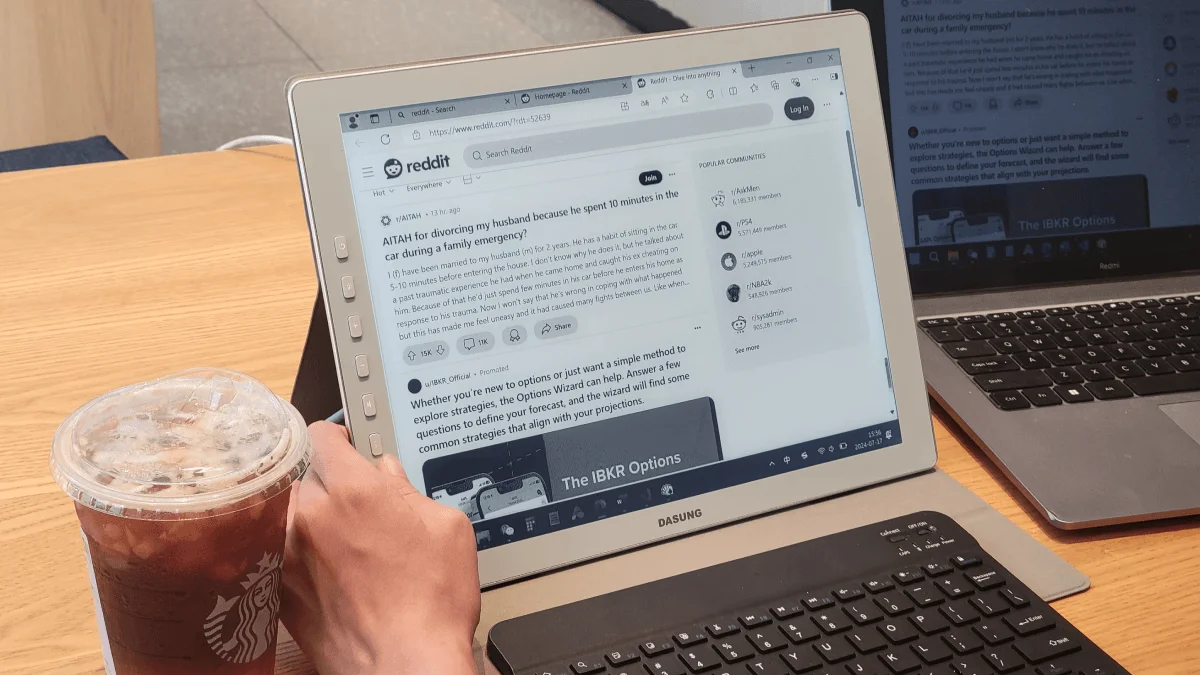
I spend 10 hours a day staring at a screen. After a particularly bad week of eye strain, I got a Dasung Paperlike 103 — the world’s first 60Hz E Ink monitor — and used it as my primary display for seven days. Here’s what surprised me.
The setup
The Dasung Paperlike 103 is a 10.3-inch E Ink monitor running at 60Hz — the first E Ink panel to hit that refresh rate. At 60Hz the cursor moves smoothly and typing feels responsive. It connects via USB-C and your computer treats it as a standard external display.
I used it for: writing code in VS Code, reading documentation, writing articles (including this one), and email. No video. No image editing. No web browsing with heavy JavaScript animations. Pure text work.
Day 1-2: The adjustment
The first day was rough. Even at 60Hz, typing has a barely-noticeable delay — but much better than earlier E Ink monitors (which ran at 10-15 fps). By day two, my brain had compensated. I was typing at full speed without noticing anything.
The bigger adjustment was the monochrome display. Syntax highlighting in VS Code becomes shades of gray. I had to switch to a high-contrast theme (kanagawa-dragon, if you’re curious) that uses bold and italic for distinction rather than color alone. Once I dialed in the contrast settings, coding felt… fine. Not amazing. Not bad. Just fine.
Day 3-5: The eye strain disappeared
This is the part everyone asks about. By day three, my usual 3 PM eye fatigue — that burning, gritty feeling after hours of LCD — was gone. Completely. I finished work without the headache that had become my normal afternoon companion.
The reason is simple physics. LCDs emit light directly into your eyes. E Ink reflects ambient light, like paper. Your eyes work less to focus. No blue light filter needed because there’s no backlight to fight.
By day five, I noticed I was reading documentation more thoroughly. When there’s no distraction from notifications (I disabled everything on the second screen), you actually read the whole paragraph instead of skimming.
Day 6-7: The real use case
By the end of the week, I’d settled on a dual-monitor setup: E Ink for reading and writing, LCD for color-dependent work and fast UI interactions. This is the optimal configuration, not a compromise.
The E Ink monitor isn’t an LCD replacement. It’s a second display for deep work sessions. When I need to focus — writing code, reading documentation, drafting — I move that window to the E Ink screen. When I need to test the UI or check design mocks, I use the LCD.
Should you buy one?
Only if you have specific eye strain problems that LCDs cause, or if you do hours of pure text work daily (programming, writing, research). It’s not cheap — $339 for the Paperlike 103 — but for people who spend 8+ hours a day reading and writing, the eye strain relief is transformative.
For casual use, an e-reader + a good pair of computer glasses is a much better investment. The E Ink monitor excels at one thing — making long hours of text work physically bearable. If that’s your bottleneck, it’s worth every dollar.