
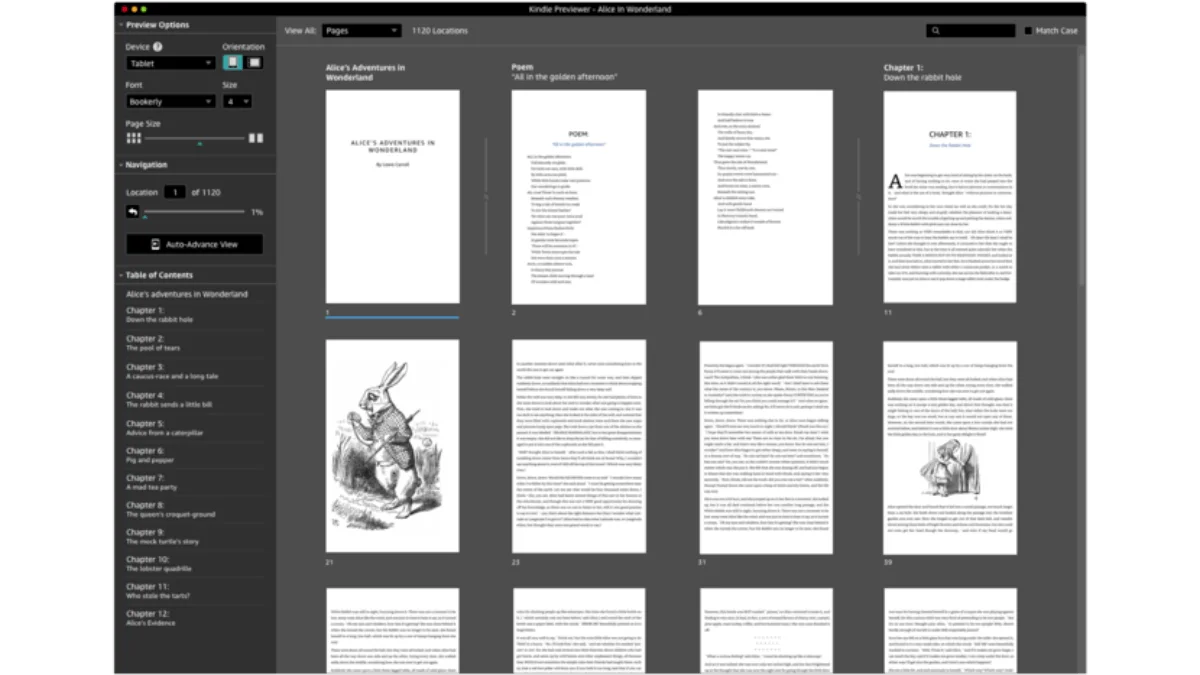
Kindle Previewer is Amazon’s official tool for previewing how ebooks will look on Kindle devices. Essential for authors and publishers.
What is Kindle Previewer?
Kindle Previewer simulates all Kindle models — from the basic Kindle to Kindle Scribe, Paperwhite, and Oasis. It lets you:
- Preview ebooks in all Kindle formats (KFX, AZW, MOBI, EPUB)
- Check formatting on multiple device simulations
- Identify rendering issues before publishing
- Convert EPUB files to Kindle format
- Test fixed-layout ebooks and comics
At its core, Kindle Previewer renders your ebook through the same engine that actual Kindle devices use. So when you see a broken image or a misaligned chapter heading in the previewer, that’s exactly what a reader will see on their device. This is different from more generic ebook viewers like Calibre, which use their own rendering engines and may show your book looking perfectly fine — even when it won’t on a real Kindle. You don’t want to find out about a formatting disaster from a one-star review. Kindle Previewer catches those problems before your book goes live.
The tool also doubles as Amazon’s recommended conversion utility for KDP publishing. When you upload an EPUB to Kindle Direct Publishing, Amazon’s backend converts it using essentially the same engine that powers Kindle Previewer. So previewing locally with this tool gives you the most accurate possible picture of how KDP will handle your file.
Download
| Platform | Version | Download |
|---|---|---|
| Windows | 3.52 | Amazon official link |
| macOS | 3.52 | Amazon official link |
Note: Kindle Previewer 3.48+ no longer supports AZW/AZW3 preview. If you need this, keep version 3.43.
Amazon updates Kindle Previewer regularly, so the version numbers above may shift. The download links point to Amazon’s CloudFront CDN and should always serve the latest stable release. You can also find the installer on the Kindle Previewer product page, though the direct links above are faster.
Installing
Windows
- Download the
.exeinstaller - Run the installer — you may need administrator privileges
- Launch from the Start menu
- On first launch, Kindle Previewer may download additional rendering components. Let it finish.
macOS
- Download the
.pkgfile - Double-click and follow the installation prompts
- Launch from the Applications folder
- If macOS blocks the app with a security warning, go to System Settings → Privacy & Security and click “Open Anyway”
Kindle Previewer requires about 500 MB of disk space after installation. It’s not tiny, but that’s because it bundles rendering engines for every Kindle model. You’re essentially carrying a virtual shelf of Kindles on your computer.
Supported Input Formats
Kindle Previewer accepts the following file types:
| Format | Extension | Notes |
|---|---|---|
| EPUB | .epub | Recommended for KDP uploads |
| MOBI | .mobi | Legacy format, limited preview in v3.48+ |
| AZW | .azw | Older Kindle format |
| KFX | .kfx | Amazon’s current native format |
| HTML | .html | Single-file HTML documents |
| Limited preview support | ||
| DOCX | .docx | Direct Word document preview |
For most users, the workflow is straightforward: create your manuscript in a word processor or writing app, export to EPUB (or convert using Calibre or Pandoc), then open the EPUB in Kindle Previewer. EPUB is the preferred input format because it preserves structure, metadata, and styling better than DOCX or HTML alone.
How to Use
Basic Preview
- Open Kindle Previewer
- File → Open Book → select your EPUB or MOBI file
- The book opens in the default device simulation
- Click through pages to check formatting
Switch Devices
From the Device menu, choose:
- Kindle Paperwhite (6.8”)
- Kindle Scribe (10.2”)
- Kindle Oasis (7”)
- Kindle Basic (6”)
- Kindle Colorsoft
- Kindle for iPhone/iPad/Android
Each device simulation renders at the correct resolution and screen size. The Paperwhite view shows grayscale e-ink rendering, while Colorsoft shows how color images and covers will appear. If your book relies on color-coded diagrams or vibrant illustrations, testing on both grayscale and color modes is essential — what pops in color can turn into indistinguishable grey blobs on e-ink.
Check for Errors
- Tools → Check Book
- Kindle Previewer highlights any formatting issues
- Fix issues in your source file and re-preview
The error check catches things like broken internal links, missing images, invalid HTML structure, and unsupported CSS properties. It’s not exhaustive — it won’t flag subjective issues like poor typography — but it catches the technical problems that cause books to fail KDP’s automated checks.
Testing Your Book Before Publishing
Here’s a practical testing checklist to run through before you upload to KDP:
- Flip through every chapter. Don’t just spot-check. Scroll through every single page. It’s tedious, but a garbled paragraph on page 87 is invisible until a reader finds it.
- Test the table of contents. Click every entry. Broken TOC links are one of the most common KDP rejection reasons.
- Check images on multiple devices. An image sized for Scribe might overflow on a basic Kindle screen.
- Verify endnotes and footnotes. Pop-up footnotes behave differently across Kindle models. Test them on Paperwhite (pop-up mode) and Scribe (often displayed inline).
- Test dark mode. Kindle devices have a dark mode. Check that your text remains readable against a black background and that any custom-colored elements don’t vanish.
- Examine the cover. Amazon displays covers at specific aspect ratios. Make sure yours renders without stretching or cropping on all device simulations.
This whole process usually takes 30–60 minutes for a standard novel. For heavily formatted books — textbooks, cookbooks, photography books — budget more time. The payoff is a book that looks professional on every Kindle a customer might own.
Using Kindle Previewer as a Converter
Kindle Previewer can also convert EPUB files to Kindle format:
- File → Open Book → select your EPUB
- File → Export as → Kindle Format (KFX)
- Choose output destination
- The converted file is ready for sideloading
This is the best free method to convert EPUB to KFX (Amazon’s newest format). The KFX format supports enhanced typesetting features — better hyphenation, kerning, ligatures, and page layout — that older MOBI and AZW3 formats lack. If you’re sideloading books to your own Kindle via USB, KFX files will look noticeably better than MOBI files, with text that flows more naturally and typography that approaches print quality.
For converting to KPF (Kindle Package Format), the workflow is slightly different. KPF is the native format used by Kindle Create, Amazon’s book creation tool. If you’ve built your book in Kindle Create, the KPF file is what you’d submit to KDP directly. Kindle Previewer can read KPF files for previewing, but it doesn’t export to KPF — that’s Kindle Create’s job. The two tools complement each other: Kindle Create for authoring enhanced-layout books, Kindle Previewer for verifying they look right.
Kindle Previewer vs Calibre’s Ebook Viewer
Both Kindle Previewer and Calibre’s built-in ebook viewer can display EPUB files, but they serve different purposes:
| Feature | Kindle Previewer | Calibre Viewer |
|---|---|---|
| Rendering engine | Kindle-native (accurate) | Calibre’s own engine |
| Device simulation | All Kindle models | None |
| KDP preview accuracy | High (same engine) | Variable |
| Library management | None | Full library |
| Format conversion | EPUB → KFX only | Dozens of formats |
| Error checking | KDP-focused | General EPUB validation |
| Price | Free | Free |
Calibre’s viewer is great for reading and quick checks. But it uses its own rendering engine, so what you see in Calibre may differ from what a Kindle displays. Kindle Previewer’s rendering is authoritative — it shows exactly what Kindle customers will see. For casual reading, use Calibre. For pre-publication quality assurance, use Kindle Previewer. Ideally, use both: Calibre for library management and initial format checks, Kindle Previewer for the final device-accurate review.
Integration with Kindle Create
Kindle Create is Amazon’s tool for building books with enhanced formatting — think textbooks with sidebars, cookbooks with structured recipes, or children’s books with fixed layouts. Kindle Previewer integrates with Kindle Create in two ways:
- Import KPF files. If you’ve built a book in Kindle Create and exported it as KPF, you can open that KPF directly in Kindle Previewer for device-specific testing.
- Compare output. For books that don’t need Kindle Create’s enhanced features, you can build the same manuscript in both tools and compare how they render. EPUB-based books converted through Kindle Previewer often produce cleaner, more predictable results than books authored entirely within Kindle Create, especially for text-heavy works.
The general rule: if your book is mostly text (novels, memoirs, essays), skip Kindle Create and go EPUB → Kindle Previewer. If your book has complex layout needs (cookbooks, travel guides, children’s picture books), use Kindle Create for authoring and Kindle Previewer for final verification.
Pro Tips
- Preview on multiple devices — what looks good on Paperwhite may break on Scribe
- Check images — ensure they render correctly on grayscale and color models
- Test Table of Contents — verify all links work
- Use landscape mode — some readers use this for PDFs
- Check endnotes — pop-up footnotes behave differently on different models
Kindle Previewer vs KindleGen
| Feature | Kindle Previewer | KindleGen |
|---|---|---|
| GUI interface | ✅ Yes | ❌ Command line only |
| Preview | ✅ Yes | ❌ No |
| Convert EPUB | ✅ Yes (to KFX) | ✅ Yes (to MOBI) |
| Check errors | ✅ Yes | ❌ No |
| Supported formats | EPUB, MOBI, AZW, KFX | HTML, EPUB → MOBI |
| Actively maintained | ✅ Yes | ❌ Discontinued |
Troubleshooting
| Problem | Solution |
|---|---|
| Can’t open EPUB | EPUB may be corrupted — check in Sigil first |
| Preview looks wrong | Try a different device simulation |
| Conversion fails | Check for unsupported formatting |
| Crashes on launch | Reinstall, or clear cache in Preferences |
| AZW not loading | Downgrade to Kindle Previewer 3.43 |
Additional common issues:
- Slow performance on large books. Books over 1,000 pages with many images can make Kindle Previewer sluggish. Close other applications to free up memory, or split your book into smaller sections for testing.
- Missing fonts. Kindle Previewer uses a limited set of system fonts. If your EPUB references a custom font that isn’t embedded, the text will fall back to a default serif or sans-serif face. Always embed fonts in your EPUB if you’re using anything beyond standard system fonts.
- Blank pages after conversion. This usually means the source EPUB has invalid HTML or CSS that the conversion engine can’t parse. Run your EPUB through Sigil’s validation checker or the EPUBCheck tool before opening it in Kindle Previewer.
- Images appear too small. Kindle Previewer automatically scales images to fit each device’s screen. If an image looks tiny, it may have a low intrinsic resolution. Use images at least 1,200 pixels on the longest side for full-page illustrations.
Final Thoughts
Kindle Previewer isn’t the flashiest tool, but it’s the closest thing to holding a printed proof before your book goes to press. The 30 minutes you spend testing on every device simulation will save you from the kind of formatting complaints that sink book ratings. Pair it with a solid EPUB export from your writing workflow — whether that’s Pandoc, Calibre, or a dedicated EPUB editor — and you’ll catch virtually every rendering issue before a reader ever sees your book.