
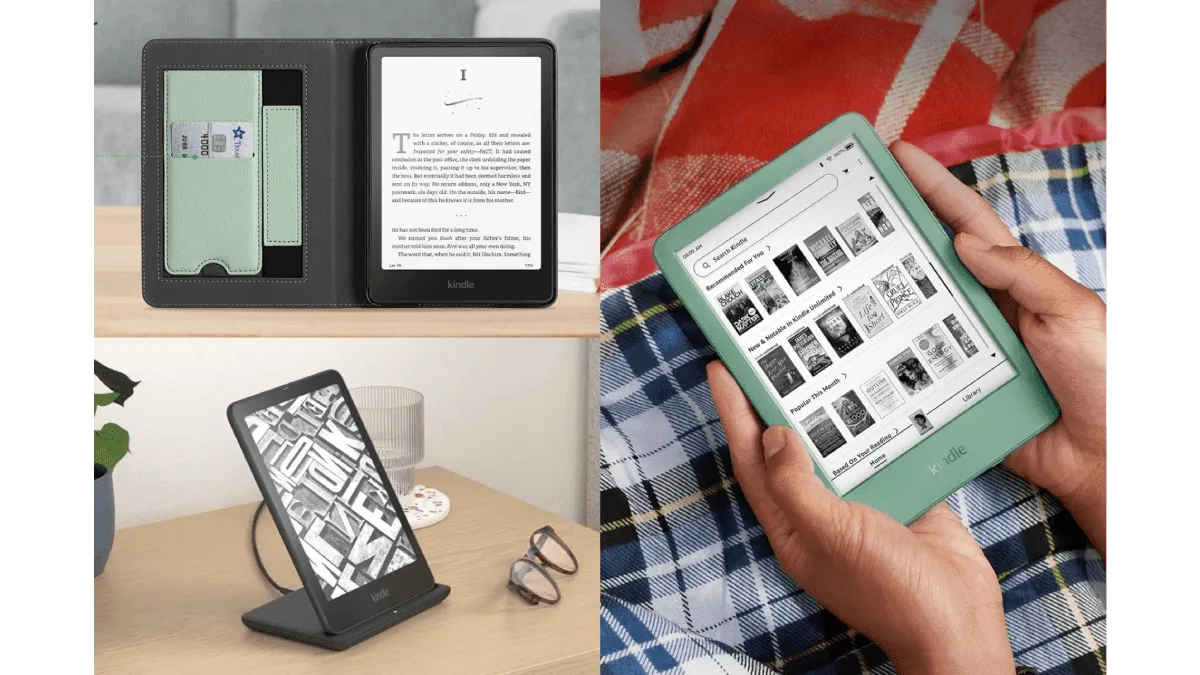
I’ve dropped a Kindle exactly once — off a nightstand onto hardwood, corner-first. The Fintie shell case took the hit. The Kindle was fine. That $14 case bought me about $140 worth of peace of mind, and I’ve never gone caseless since.
Accessories for e-readers live in a strange market. Half the products on Amazon are identical items with different brand names stamped on them. The other half are genuinely useful tools that transform how you read. After testing dozens across Kindle, Kobo, BOOX, and reMarkable, here’s what’s worth your money — and what isn’t.
Cases and covers
This is the one accessory everyone should own. A good case protects against drops and scratches, and a sleep/wake cover means you never touch the power button. I’ve used three types:
Shell cases (Fintie, MoKo, Ayotu) are the budget workhorses. Hard plastic back, magnetic flip cover, auto wake/sleep. They weigh about 120 grams and cost $12–$20. After two years the edges fray a bit, but the device underneath stays pristine. Fintie and MoKo are essentially interchangeable — buy whichever is on sale for your specific model.
Origami stand cases fold into a triangular prop. If you read at a desk or eat lunch with an e-reader propped up, this is a small revelation. No more leaning the device against a coffee mug. The fold stays put, angles the screen just right, and you can tap to turn pages without the whole thing sliding flat. I’ve used one on a Kobo Libra and it held fine even on the slightly curved ergonomic grip side. Expect to pay $18–$30. The Amazon-branded fabric Origami case for Kindle costs more ($35–$40) but uses a nicer textured material that doesn’t peel.
Sleeves are for people who prefer the feel of a naked device. A felt or neoprene sleeve from Etsy — handmade, padded, pretty — slides off when you read and back on when you’re done. The upside: reading feels better in the hand, no flap to fold back. The downside: you have to remember to put the device back. I forgot. More than once. I went back to shell cases.
Per-device recommendation: Kindle Paperwhite and Kobo Clara fit most generic shell cases. Kindle Scribe and reMarkable 2 need device-specific cases because of their larger dimensions — the official magnetic folios are expensive but fit perfectly and double as excellent stands.
Screen protectors
I wrote a full guide on screen protectors, so I’ll keep this brief. Most e-reader users don’t need one — a flip case handles scratch protection better. The exception is stylus-driven devices. If you use a reMarkable 2 or Kindle Scribe daily for notes, a tempered glass or Doodroo matte film is cheap insurance against micro-scratches from the stylus tip. For BOOX devices, check if your model ships with a factory-applied protector before buying anything — peeling it off and replacing it with a worse one is a common mistake.
Page turners
Bluetooth page turners are a niche accessory that, once you try one, feel less niche. They’re small remotes — usually a ring that goes on your finger or a handheld clicker — that send a page-turn signal to your e-reader over Bluetooth. The use case: you’re reading in bed, device propped on a stand, hands under the blanket. No reaching out of the warm cocoon to tap the screen.
The SYUKUYU RF remote is the most popular on Amazon and works with Kindle and Kobo (via Bluetooth or a clip-on sensor). It’s about $20. Setup takes two minutes: pair over Bluetooth, assign the volume buttons as page-turn triggers in your e-reader’s accessibility settings. The lag is negligible — maybe 100ms — and the battery lasts months.
Are they necessary? Absolutely not. Are they delightful on a cold winter night with a stand-mounted Kindle? Absolutely yes.
Reading lights
Not every e-reader has a front light. If you’re on an older Kindle Basic (10th gen and earlier) or a reMarkable 2, a clip-on light is non-negotiable for reading after dark. The cheap dollar-store ones with harsh blue-white LEDs are miserable — they wash out the screen and leave you squinting.
Get something with an amber LED (around 1800K–2200K). It’s gentler on your eyes and won’t broadcast to your sleeping partner that you’re still awake at 1 AM. The Glocusent clip-on is the gold standard: three color temperatures, six brightness levels, flexible gooseneck, rechargeable via USB-C, and a clamp that doesn’t mark the device. It costs about $20.
For people who read in bed next to a partner, amber light is the difference between “I didn’t even notice you were reading” and “can you please put that away.”
Styli
Not every e-reader supports a stylus, and not every stylus is cross-compatible. Here’s the breakdown:
Kindle Scribe: Uses the Amazon Premium Pen, which is included. Wacom EMR-compatible styli from Samsung (S Pen), Staedtler, or Lamy also work. The Staedtler Norris Digital is a fan favorite for its pencil-like feel and $30 price tag.
reMarkable 2: The Marker Plus is the best stylus I’ve used on any e-reader — eraser on the back, magnetic attachment, perfect weight. It’s also $129. The standard Marker ($79) omits the eraser. Third-party Wacom EMR pens work but the nib-to-screen feel isn’t quite the same.
BOOX: Any Wacom EMR stylus works, including the Samsung S Pen and Lamy AL-Star. BOOX’s own Pen2 Pro is decent. The Lamy with a felt nib is the best third-party pick for a textured writing feel.
Kobo Elipsa / Sage: Kobo uses its own active stylus protocol — Wacom EMR styli do not work. You must use the Kobo Stylus or Kobo Stylus 2.
Budget pick: the Staedtler Norris Digital at $30 works on Kindle Scribe, reMarkable, and BOOX. It’s not as premium as the Marker Plus but it’s 75% of the experience at 25% of the price.
Chargers and cables
E-readers charge slowly by design — most top out at 5W to 10W — so any USB-C cable works. The one accessory worth getting is a magnetic charging cable with a tiny adapter that stays in the device’s port. It reduces wear on the USB-C socket (which on an e-reader might see hundreds of plug cycles over its lifespan) and makes charging feel effortless: bring the cable near the port and it snaps into place.
NetDot and VOLTA make decent magnetic cables for $10–$15. Make sure you get the USB-C tip variant and a cable that supports data transfer, not just power — you’ll need data for Calibre sideloading.
Storage and travel gear
If you travel with multiple devices — say, a Kindle for reading and a reMarkable for notes — a padded tech pouch keeps them from grinding against each other. The Tomtoc sling or a basic neoprene tablet sleeve from Amazon handles two e-readers comfortably.
For the ultra-minimalist: a simple adhesive strap or PopSocket on the back of a bare e-reader makes one-handed reading dramatically easier on larger devices like the Scribe or BOOX Tab Ultra. The adhesive sticks to the device back, not the screen, so there’s no damage risk. On a 7-inch Kindle Oasis or Kobo Libra with its built-in grip ridge, this is unnecessary — but on a flat-back 10-inch tablet it transforms the ergonomics.
What I’d actually buy (budget vs. premium)
If you gave me $50 and a Kindle Paperwhite, here’s the shopping list:
- Fintie shell case ($14)
- Magnetic USB-C charging cable ($12)
- Glocusent amber clip light if the device lacks a front light ($20)
- Total: $26–$46
If budget is no concern and you own a Kindle Scribe or reMarkable:
- Official folio case with stand ($50–$80)
- Marker Plus or Premium Pen (included or $30–$129)
- Doodroo paper-feel screen protector ($25)
- SYUKUYU page turner remote ($20)
- Padded Tomtoc travel sleeve ($25)
The shell case and the amber light are the only two items I’d call genuinely essential. Everything else is gravy — but good gravy makes the meal.