
 Inksky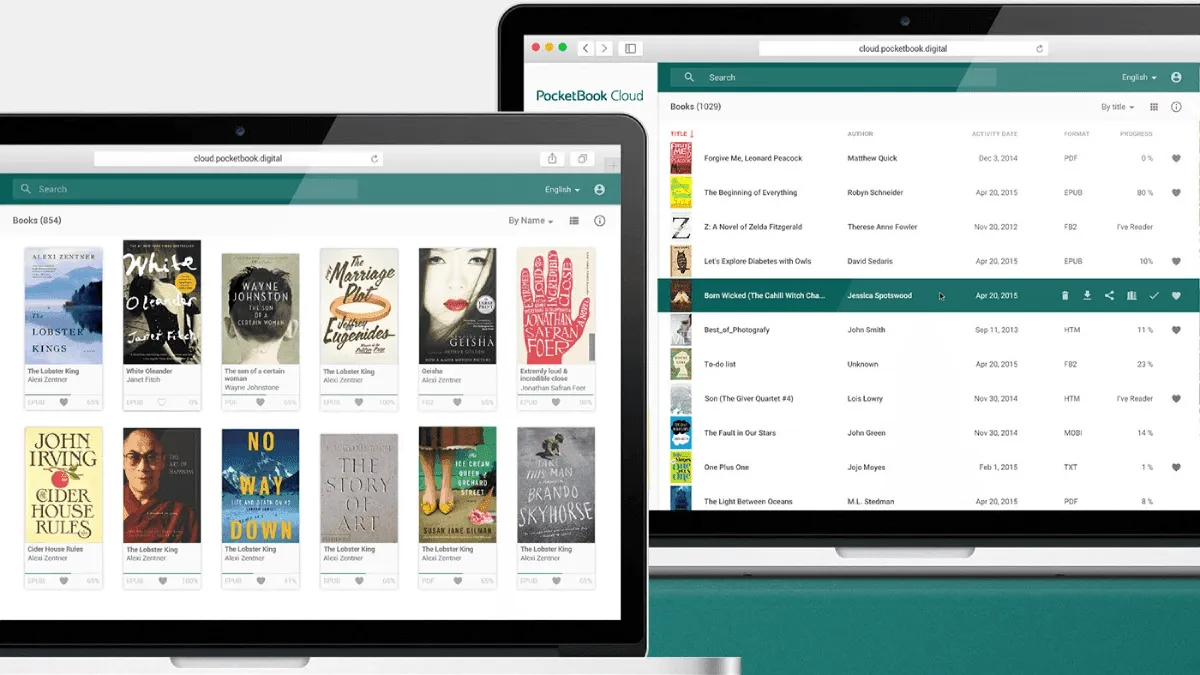
PocketBook has its own ecosystem of tools and services. Here’s everything you need to know.
PocketBook Cloud
PocketBook Cloud is the brand’s free sync service. It keeps your library, reading progress, and bookmarks in sync across devices.
Features
| Feature | Free Plan | Notes |
|---|---|---|
| Storage | 5 GB | Enough for thousands of books |
| Sync reading progress | ✅ Yes | Across PocketBook devices and apps |
| Sync bookmarks | ✅ Yes | Never lose your place |
| Wireless transfer | ✅ Yes | Upload via web, read on device |
| Device limit | Unlimited | All your PocketBook devices |
How to Set Up
- On your PocketBook, go to Settings → Accounts → PocketBook ID
- Create an account or sign in
- Enable Cloud Sync in settings
- Your books and progress sync automatically
Web Upload
Upload books from any browser:
- Go to cloud.pocketbook.com
- Sign in with your PocketBook ID
- Upload EPUB, PDF, or MOBI files
- They appear on your PocketBook wirelessly
Send-to-PocketBook Email
Each PocketBook device has a unique email address. Email books directly to your device.
How to Find Your Email
Settings → Accounts → Send-to-PocketBook Email
How to Use
- Email your EPUB, PDF, or TXT file as an attachment
- Send it to your PocketBook email address
- The book appears on your device wirelessly
Supported formats: EPUB, PDF, DJVU, FB2, DOCX, TXT, MOBI
Dropbox Integration
PocketBook has built-in Dropbox support — the easiest way to transfer files wirelessly.
Setup
- On your PocketBook, go to Settings → Accounts → Dropbox
- Sign in to your Dropbox account
- Books in your Dropbox appear in the Dropbox folder on your device
Tips
- Create a “PocketBook” folder in Dropbox for organization
- Upload files from your phone via the Dropbox app
- Changes sync wirelessly within minutes
PocketBook Desktop App
The official desktop app for managing your PocketBook library.
| Platform | Download |
|---|---|
| Windows | PocketBook Official Site |
| macOS | PocketBook Official Site |
Features
- Library management (like a light version of Calibre)
- Book format conversion
- Dictionary downloads
- Firmware updates
- Cloud sync management
When to Use It
- First-time setup (downloads initial firmware and dictionaries)
- Managing a large library without Calibre
- Installing official dictionaries
PocketBook Reader App (Mobile)
The PocketBook Reader app is available for iOS and Android. It syncs with your PocketBook Cloud.
| Feature | Benefit |
|---|---|
| Sync reading position | Switch between phone and e-reader smoothly |
| Same book, any device | Read on phone during commute, e-reader at home |
| Notes and bookmarks | Synced across all devices |
Download for iOS Download for Android
ReadRate
ReadRate is PocketBook’s social reading platform — like Goodreads but built into your PocketBook.
Features
- Rate and review books
- See what others are reading
- Book recommendations
- Reading statistics
- Community discussions
How to Access
- On your PocketBook, tap ReadRate in the main menu
- Browse popular books and reviews
- Rate books you’ve finished
Text-to-Speech (TTS)
PocketBook has the best built-in TTS of any e-reader brand. It reads books aloud through the built-in speaker or Bluetooth headphones.
Languages Supported
English, German, French, Spanish, Italian, Dutch, Russian, Polish, Ukrainian, and more.
How to Use
- Open a book
- Tap center → TTS icon (speaker)
- Choose voice and speed
- Press play
TTS Voices
- Standard voices — included, good quality
- Premium voices — downloadable, more natural
- Acapela voices — third-party, highest quality
PocketBook vs Other Brand Ecosystems
| Feature | PocketBook | Kindle | Kobo | BOOX |
|---|---|---|---|---|
| Cloud storage | ✅ 5GB free | ✅ Amazon Cloud | ✅ Kobo Cloud | ✅ Dropbox |
| Mobile app sync | ✅ Full sync | ✅ Full sync | ✅ Limited | ❌ N/A |
| Desktop app | ✅ Yes | ✅ Yes | ✅ Yes | ❌ N/A |
| Social reading | ✅ ReadRate | ✅ Goodreads | ❌ No | ❌ No |
| TTS built-in | ✅ Excellent | ⚠️ VoiceView | ❌ No | ✅ Via apps |
| Email-to-device | ✅ Yes | ✅ Send-to-Kindle | ❌ No | ❌ No |
Pro Tips
- Use Cloud for backups — your library is safe even if you lose the device
- Combine Dropbox + Cloud — Dropbox for file transfer, Cloud for sync
- Download TTS voices — premium voices make a big difference
- Use ReadRate for discovery — find books recommended by PocketBook users
- Calibre is still better for heavy library management — PocketBook’s desktop app is basic