
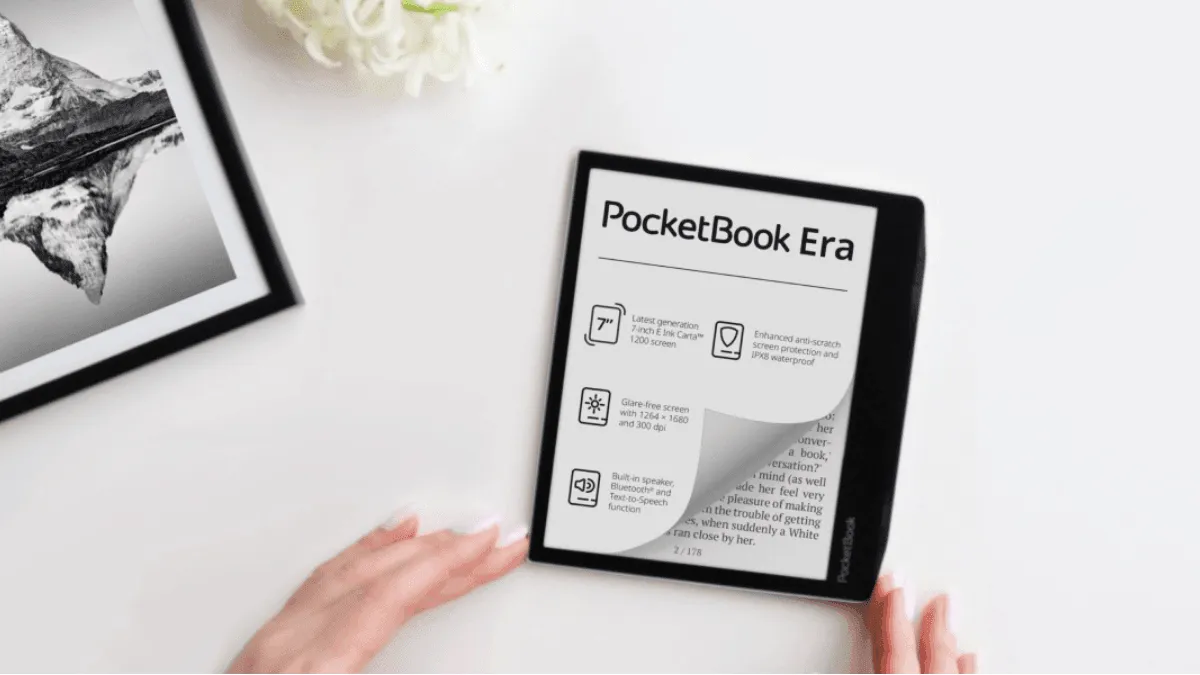
The PocketBook Era and Kobo Libra Colour are the two most compelling 7-inch e-readers that are not locked to a single ecosystem. Both have physical page-turn buttons, IPX8 waterproofing, and excellent format support. They appeal to the same type of reader — someone who wants freedom from Amazon’s walled garden, reads sideloaded books, and values hardware buttons. Here is how they compare.
Quick Comparison
| Feature | PocketBook Era | Kobo Libra Colour |
|---|---|---|
| Screen | 7” E Ink Carta 1200, 300 PPI | 7” Kaleido 3 Color E Ink, 150 PPI (color) / 300 PPI (B&W) |
| Color | No (black and white only) | Yes (4,096 colors) |
| Physical Buttons | Yes | Yes |
| Warm Light | Yes (SMARTlight) | Yes (ComfortLight PRO) |
| Waterproof | IPX8 | IPX8 |
| Speaker | Yes | No |
| Storage | 16 GB / 64 GB | 32 GB |
| Weight | 228g | 199g |
| Price | $199 | $219 |
Screen: Color vs Sharpness
This is the fundamental trade-off between these two devices. The PocketBook Era has a traditional black-and-white Carta 1200 screen at 300 PPI — text is razor-sharp, identical to the Kindle Paperwhite. The Kobo Libra Colour uses a Kaleido 3 color E Ink panel that adds a color filter layer on top of the black-and-white display.
The cost of color is sharpness. In black-and-white mode, the Libra Colour renders text at 300 PPI — but with a slightly grainier, darker background than a dedicated monochrome screen. The color filter reduces overall contrast. In color mode, resolution drops to 150 PPI, which is fine for book covers and highlighted text but noticeably softer than monochrome.
For pure text reading, the PocketBook Era’s screen is sharper and has better contrast. For reading illustrated books, comics, or viewing color-coded highlights, the Libra Colour’s color capability is a real advantage. There is no right answer — it depends on what you read.
Build and Ergonomics
Both are beautifully designed with asymmetrical bezels, a wider side grip, and physical buttons positioned for thumb access. The PocketBook Era feels more premium — its metal backplate and textured grip area give it a higher-end build quality than the Libra Colour’s plastic body. At 228g, the Era is noticeably heavier than the Libra Colour at 199g, but the weight is well-balanced and the thicker grip side makes it easier to hold.
The physical buttons are excellent on both. The Era uses rocker-style buttons with distinct clicks. The Libra uses softer buttons with less travel. Neither is better — it is a preference thing. Both can be configured to swap which button goes forward and which goes back.
PocketBook adds a unique feature: a built-in speaker and text-to-speech support. You can listen to ebooks read aloud without Bluetooth headphones. It is robotic-sounding but functional, and useful for continuing a book while doing dishes or folding laundry. The Libra Colour has no speaker and no built-in TTS — you need Bluetooth headphones and audiobooks for audio.
Format Support: PocketBook’s Killer Feature
PocketBook supports 25 formats out of the box: EPUB, PDF, MOBI, FB2, TXT, DJVU, RTF, DOC, HTML, CHM, and a dozen more. No conversion. No plugins. No Calibre required (though Calibre makes library management easier). Drag any supported file over USB and it appears in the library. This is PocketBook’s single biggest advantage over every other e-reader brand.
Kobo reads EPUB, PDF, MOBI, and a handful of image formats. For anything beyond standard formats, you need Calibre to convert files before sideloading. Kobo’s format support is good enough for 95% of readers, but PocketBook’s breadth is genuinely useful if you read academic papers (DJVU), old ebooks (FB2, CHM), or use multiple ebook stores.
Software and Ecosystem
PocketBook runs a lightweight Linux-based OS with a simple, functional interface. It is fast, stable, and gets out of the way. The library view offers multiple sorting options, and the reader app has all the standard adjustments (font, margins, line spacing, brightness, warmth). There is no store integration, no social features, no reading stats dashboard. It is a reading device, nothing more.
Kobo’s software is more polished and feature-rich. Reading stats track your sessions, books finished, and average reading speed. The home screen recommends books from the Kobo store. Pocket integration saves web articles. OverDrive is built in for library borrowing. The UI is busier than PocketBook’s but more capable.
If you want a device that does one thing perfectly (display books you already own), PocketBook’s software is more focused. If you want a device that also helps you discover, track, and manage reading, Kobo’s software is better.
Which Should You Buy?
Buy the PocketBook Era if:
- You read diverse file formats and hate converting
- You want the sharpest possible text (monochrome over color)
- You value build quality and a premium feel
- Text-to-speech matters to you
- You sideload most books and do not need a store
Buy the Kobo Libra Colour if:
- You read comics, manga, or illustrated books
- You want integrated library borrowing (OverDrive)
- You prefer a lighter device at 199g
- You value reading stats and software polish
- Color highlighting and annotation matters to you
For the pure reading experience — crispest text, best format support, most focused software — the PocketBook Era wins. For the most versatile reading experience — color content, library integration, reading stats — the Kobo Libra Colour wins. Both are excellent devices that prove you do not need a Kindle to have a great e-reader.
Frequently asked questions
Can PocketBook read Kindle books?
Not directly. Kindle books are DRM-locked to Amazon's ecosystem. To read Kindle purchases on a PocketBook, you must remove the DRM with Calibre and convert to EPUB. PocketBook natively reads EPUB, MOBI, and 20+ other formats without conversion.
Does PocketBook have a store like Kobo?
PocketBook has a built-in bookstore, but it is smaller than Kobo's and varies by region. The device is designed primarily for sideloading and library borrowing, not for buying directly from the device. Kobo has the larger integrated store.
Which is better for library books?
Kobo has built-in OverDrive integration — browse, borrow, and read library books directly on the device. PocketBook supports Adobe DRM for library ebooks but requires downloading the ACSM file on a computer first and transferring via Adobe Digital Editions. Kobo is more convenient for library users.