
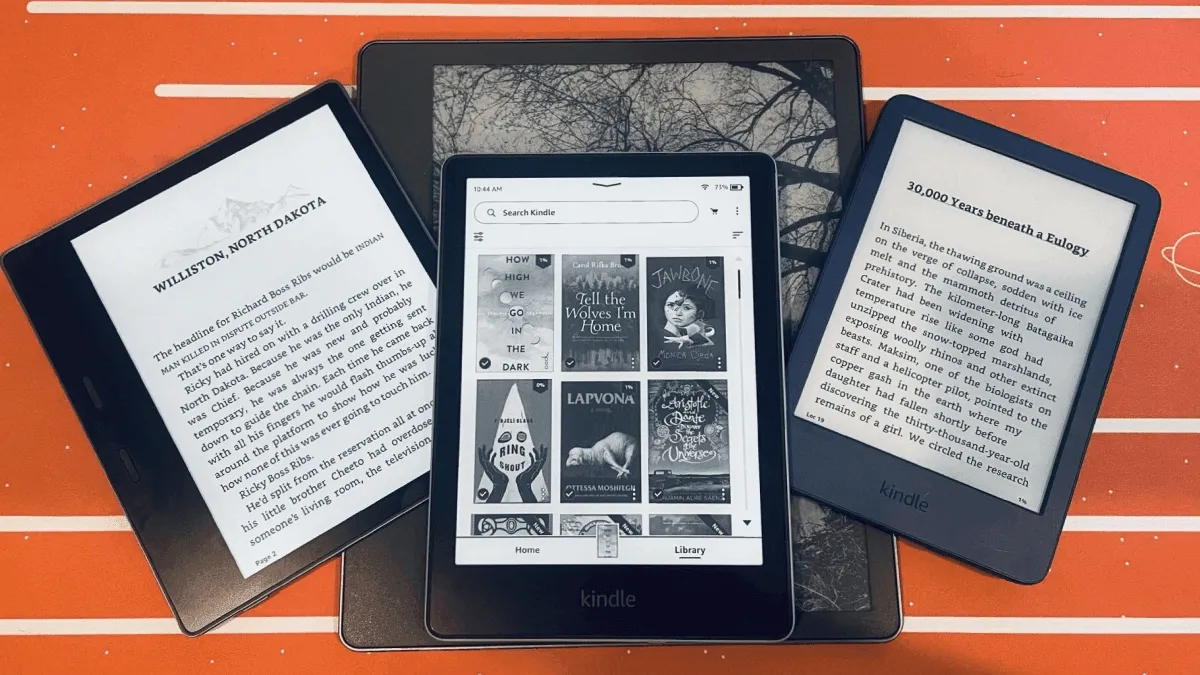
Amazon’s Kindle lineup has never been more diverse. There are currently four distinct models on sale, each aimed at a different reader and a different budget. The problem is that Amazon doesn’t make it easy to tell them apart — the naming conventions are messy, the spec sheets overlap, and the price gaps don’t always correspond to obvious feature jumps. Here’s how to cut through the noise and pick the right one.
Full Spec Comparison
| Feature | Kindle Basic (11th Gen) | Paperwhite (12th Gen) | Paperwhite Signature | Scribe (2024) | Oasis (10th Gen) |
|---|---|---|---|---|---|
| Price | $109.99 | $159.99 | $189.99 | $399.99 | $279.99 |
| Screen | 6” 300ppi | 7” 300ppi | 7” 300ppi | 10.2” 300ppi | 7” 300ppi |
| Release Year | 2024 | 2024 | 2024 | 2024 | 2019 |
| Weight | 158g | 205g | 208g | 433g | 188g |
| Storage | 16GB | 16GB | 32GB | 16/32/64GB | 8/32GB |
| Warm Light | No | Yes | Yes | Yes | Yes |
| Waterproof | No | Yes (IPX8) | Yes (IPX8) | No | Yes (IPX8) |
| Charging | USB-C | USB-C | USB-C + Wireless | USB-C | microUSB |
| Battery | ~6 weeks | ~10 weeks | ~10 weeks | ~12 weeks | ~6 weeks |
| Stylus | No | No | No | Yes (Premium Pen) | No |
| Auto-Adjust Light | No | No | Yes | Yes | Yes |
A few things jump out immediately. The Oasis still uses microUSB in a world where everything else has moved to USB-C — that alone tells you how old the hardware is. The Paperwhite Signature Edition costs only $30 more than the standard Paperwhite but adds wireless charging, auto-adjusting light, and double the storage. And the Scribe is the only model with a stylus, but you sacrifice waterproofing and portability.
Kindle Basic (11th Gen) — budget champion
Best for: Budget buyers, kids, casual readers
The entry-level Kindle punches well above its price. You get a 300ppi display — the exact same pixel density as the Paperwhite — USB-C charging, and 16GB of storage, all for $109.99. For pure reading, the experience is nearly identical to devices costing $50 more.
What you give up: no warm light, no waterproofing, and a smaller 6-inch screen. If you read exclusively indoors and don’t take your Kindle to the beach or bathtub, none of those matter. The smaller screen is actually a feature if you value portability — at 158 grams, it disappears in a jacket pocket.
The 2024 refresh brought USB-C and improved contrast, making it a substantial upgrade over the 2022 model. If you’re upgrading from anything older than a 2022 Kindle Basic, the jump is noticeable.
Kindle Paperwhite (12th Gen) — the one for almost everyone
Best for: Most people
This is the sweet spot in the lineup and the device I recommend to 90% of buyers. The 12th-gen Paperwhite has a larger 7-inch display (up from 6.8 inches on the previous generation), a faster processor, and noticeably better contrast thanks to the Carta 1300 panel. The warm light is genuinely useful for nighttime reading — it shifts from cool white to warm amber, reducing blue light exposure before bed.
Waterproofing (IPX8) means you can read in the bath, by the pool, or in the rain without worry. I’ve dropped mine in a bathtub twice and it’s still fine. The battery lasts roughly 10 weeks with moderate use, and USB-C means one less cable to carry.
The Signature Edition at $189.99 is worth the extra $30 if you want wireless charging (drop it on any Qi pad) and an auto-adjusting front light that adapts to ambient brightness. The 32GB of storage is overkill for ebooks but useful if you load up on Audible audiobooks.
Kindle Scribe — the notebook-reader hybrid
Best for: Note-takers, students, PDF readers
The Scribe is Amazon’s first device that’s as much a notebook as it is an e-reader. The 10.2-inch screen handles PDFs and textbooks at full size — no pinch-zooming or panning, which on smaller screens is genuinely frustrating. The included Premium Pen writes with low latency and the textured screen surface provides enough friction to feel paper-like, though it’s not quite at the reMarkable level for writing feel.
As a reader, the Scribe works beautifully for anything formatted for larger pages — cookbooks, graphic novels, academic papers, magazines. For novels, the size and 433g weight make it less practical. You’ll prop it on a desk or tablet stand rather than holding it one-handed in bed.
The 2024 Scribe added an AI-powered notebook summarization feature and improved PDF markup tools. If note-taking is a bonus rather than your primary use case, the Scribe is compelling. If you need a dedicated writing device, look at reMarkable instead.
The biggest downside: no waterproofing. At $399, that feels like an omission, especially when the much cheaper Paperwhite has it.
Kindle Oasis — the one to skip
Best for: Almost nobody in 2026
The Oasis was once Kindle’s premium flagship, and it still has physical page-turn buttons and an ergonomic asymmetrical design that feels great in one hand. But the hardware is from 2019. That means microUSB charging, a slower processor than the current Paperwhite, and a battery that was never great to begin with.
Amazon hasn’t officially discontinued the Oasis, but it hasn’t updated it either. At $279.99, it costs more than the Paperwhite Signature Edition while offering less. The only reason to buy an Oasis today is if physical page-turn buttons are non-negotiable and you refuse to leave the Kindle ecosystem. Even then, I’d point you toward a Kobo Libra Colour or PocketBook Era — both have buttons and more modern hardware.
If you see a used or refurbished Oasis at a steep discount, it might be worth considering. But at full retail, it’s the weakest value in the Kindle lineup.
Buying Guide by Use Case
Casual reader who reads 2–3 books a year: Kindle Basic. You don’t need warm light or waterproofing for occasional reading. Save the $50.
Daily reader who reads in bed: Paperwhite. Warm light makes a real difference for nighttime reading, and the larger screen means fewer page turns per session.
Commuter who reads on the go: Kindle Basic. Light, compact, fits in a small bag or coat pocket. You won’t cry if it gets banged up.
Student who reads textbooks and PDFs: Kindle Scribe. The 10.2-inch screen handles academic formats without zooming, and the stylus is genuinely useful for annotations.
Budget buyer looking for the best value: Paperwhite standard edition at $159.99. It has every feature most people need and nothing they don’t. The gap between it and the Basic is well worth $50.
Current vs Previous Generation
If you’re upgrading, the 2024 refreshes across the Basic and Paperwhite lines brought meaningful improvements. The Paperwhite’s jump from 6.8 to 7 inches doesn’t sound like much, but combined with the Carta 1300 panel, text looks noticeably sharper and pages turn faster. The Basic’s USB-C update finally killed the microUSB port, and the improved front light is more even than the 2022 model.
The Scribe’s 2024 update was more iterative — the hardware is similar but the software got smarter annotation features. If you have the 2023 Scribe, there’s no compelling reason to upgrade.
The Oasis hasn’t been updated since 2019. It’s effectively frozen in time.
Verdict
Paperwhite for most people. Basic for budget. Scribe for PDFs and notes. Skip the Oasis unless you find a used bargain.
Related Comparisons
- Kindle Oasis vs Paperwhite — Is the premium model worth it?
- Kindle Paperwhite vs Kobo Clara BW — How Paperwhite compares to rivals
- E-Reader Screen Sizes Compared — How Kindle sizes stack up
- Kindle vs Kobo vs BOOX 2026 — Kindle in the broader market